

How to Clean and Protect Interactive LED Floor Game Tiles

Cleaning and protecting an interactive LED floor game requires more than wiping the visible surface. Operators must control moisture, abrasive debris, chemical exposure, impact loads, electrical risk, and downtime while preserving touch or motion responsiveness, optical clarity, cabinet alignment, and safe player traction. The most reliable program combines power isolation, manufacturer-approved materials, low-moisture cleaning, prompt spill response, scheduled inspection, staff training, and documented maintenance records. Buyers should also confirm ingress protection, load ratings, replaceable surface components, ventilation requirements, warranty conditions, and after-sales support before selecting an amusement equipment supplier.
Building a Safe Maintenance Program for LED Activity Flooring
Why routine cleaning affects revenue and safety
Digital sports flooring and illuminated game platforms operate in demanding environments. Players may enter with outdoor dust on footwear, children may spill drinks, and high visitor turnover can transfer skin oils, food residue, and fine grit onto the playing area. If these contaminants remain on the surface, they can reduce traction, obscure graphics, interfere with optical sensors, and accelerate wear on protective layers. A neglected floor can also create an avoidable perception problem: visitors associate visible dirt, cloudy panels, or damaged seams with weak venue management.
For operators, cleanliness is therefore connected to several commercial outcomes. A clean play zone supports repeat visits, reduces complaints, protects brand presentation, and helps maintenance teams identify physical damage before it becomes a larger repair. The objective is not to saturate the floor with disinfectant. The objective is controlled removal of contamination without allowing liquid, aggressive chemicals, or unsuitable tools to reach LEDs, sensors, connectors, seams, or ventilation openings.
Prepare the area before any cleaning task
Place the attraction out of service, stop active sessions, and follow the equipment shutdown procedure supplied by the manufacturer. Disconnect mains power when the design and site procedure require it, and prevent customers from entering until the surface is completely dry and safe. Staff should remove loose items such as tokens, toys, paper, cable ties, and grit before using a cloth or mop. These particles can scratch transparent covers when dragged across the surface.
Use a clearly labeled cleaning kit reserved for electronic amusement equipment. A practical kit may include clean microfiber cloths, a soft non-abrasive brush, a vacuum with a soft attachment, disposable gloves, warning signage, absorbent pads, a diluted neutral cleaner approved for the surface, and a dry inspection cloth. Safety Data Sheets should be available for every chemical used onsite. The OSHA Hazard Communication Standard explains why chemical identification, labeling, and worker information are important in commercial workplaces.
Separate cleaning from electrical inspection
Cleaning staff should not open electrical compartments, remove LED modules, alter wiring, or bypass protective covers unless they are authorized and trained to do so. Surface maintenance and technical servicing should be treated as separate work categories. A supervisor can visually check cable covers, panel edges, fasteners, ventilation grilles, and unusual heat or odor, then escalate any defect to a qualified technician.
Electrical safety is especially important after a spill. Never assume that a dry-looking surface means liquid has not entered a seam. Isolate the attraction, document the affected area, and request technical inspection where moisture may have reached power distribution, controllers, sensors, or connectors. Equipment should return to operation only after the responsible technical team confirms that it is safe.
Recommended Cleaning Methods and Materials
Use a low-moisture, top-to-bottom process
Start by removing loose dust with a soft brush or a vacuum attachment that does not scratch the cover. Follow with a microfiber cloth lightly dampened with an approved solution. The cloth should be damp, not dripping. Apply the solution to the cloth rather than spraying directly onto the floor. Direct spraying increases the possibility of liquid entering joints, sensor openings, speaker grilles, cable channels, or the perimeter of a tile.
Clean in manageable sections and use overlapping passes so that no residue remains between adjacent modules. A second dry microfiber cloth should remove remaining moisture and streaks. Do not allow a wet mop, standing water, steam cleaner, pressure washer, or high-volume spray to contact the equipment unless the specific product documentation expressly permits that method. Surface materials vary, and a method suitable for sealed commercial flooring may be unsuitable for an illuminated electronic platform.
Select chemicals according to the surface and supplier instructions
A neutral, non-abrasive cleaner is commonly the safest starting point, but the equipment manual remains the controlling document. Avoid unapproved solvents, concentrated bleach, strong acids, ammonia-heavy products, abrasive powders, furniture polish, wax, silicone-based coatings, and rough scouring pads. These substances can cloud transparent covers, attack printed graphics, soften adhesives, leave a slippery film, or damage gaskets and protective finishes.
Disinfection requirements should be assessed separately from everyday soil removal. A venue serving young children, schools, hotels, or healthcare-adjacent facilities may need a documented sanitation protocol. The selected disinfectant must be compatible with polycarbonate, acrylic, rubber, coatings, adhesives, and printed surfaces. The CDC cleaning and disinfection guidance distinguishes routine cleaning from disinfection and emphasizes following product label directions, including contact time. Operators should not increase chemical concentration or shorten drying procedures without technical approval.
Respond quickly to spills, gum, and difficult residue
Spills should be handled immediately. First stop play and isolate the affected zone. Blot liquid with absorbent material rather than spreading it outward. Remove the remaining residue with a lightly dampened microfiber cloth, then dry the area and inspect adjacent seams. If liquid appears to have entered a joint or edge, do not restart the attraction simply because the top surface feels dry.
Sticky food residue should never be scraped with a metal blade. Use a soft plastic tool only if the surface instructions permit it, and test any cleaning solution on a concealed or spare component before broader use. Gum, paint, oil, and unknown substances should be recorded and escalated when routine cleaning does not remove them safely. The cost of replacing a damaged cover or graphic is usually lower than the cost of causing a larger failure through aggressive spot treatment.
| Maintenance situation | Preferred operator action | Method to avoid | Reason for control |
|---|---|---|---|
| Loose dust and grit | Soft vacuum attachment or dry microfiber cloth | Dry scrubbing with a rough pad | Reduces scratching and prevents abrasive particles from being dragged across the cover |
| Routine fingerprints and light soil | Lightly damp microfiber cloth with approved neutral cleaner | Spraying liquid directly onto modules | Limits residue and reduces the chance of liquid entering seams or openings |
| Drink spill on the surface | Stop play, isolate power when required, blot, inspect, and dry | Immediate restart after surface-only wiping | Moisture may migrate below the visible cover |
| Sticky food residue | Gentle spot cleaning using approved materials | Metal blades, abrasive powder, or solvent experimentation | Protects graphics, coatings, adhesives, and transparent panels |
| Clouding, flicker, dead area, or loose seam | Remove from service and escalate to qualified technical support | Opening powered compartments without authorization | Protects staff, customers, electronics, and warranty coverage |
Protecting the Playing Surface Between Cleaning Cycles
Control impact, abrasion, and load concentration
Cleaning cannot compensate for unsuitable operating conditions. Venue owners should define footwear rules, prohibit sharp objects, and keep food and drinks outside the active play boundary whenever practical. Furniture, ladders, display stands, and maintenance carts should not be placed on the game surface unless the supplier has confirmed the permitted load and wheel type. Concentrated loads from narrow casters or hard feet may damage covers, frames, connectors, or the supporting floor even when total equipment weight appears acceptable.
Entrance mats and a transition zone can reduce the amount of outdoor grit reaching the attraction. In high-volume family entertainment centers, staff should inspect the threshold several times per day because a clean mat becomes ineffective when saturated with dirt. Protective barriers or queue stanchions can also prevent customers from stepping onto inactive areas, leaning heavy objects against modules, or carrying drinks across the play zone.
Manage humidity, ventilation, and surrounding conditions
Electronic attractions need an environment that matches the supplier’s operating specifications. Excessive humidity can contribute to condensation and corrosion, while poor ventilation can increase heat stress on power supplies, controllers, and LED components. Keep air inlets and exhaust paths clear, maintain appropriate room conditioning, and investigate condensation, unusual heat, or repeated controller resets.
Facility teams should record room conditions when recurring faults appear. A maintenance log can connect failures with cleaning events, peak occupancy, HVAC shutdowns, or seasonal weather. This evidence helps distinguish a surface contamination issue from a power, thermal, structural, or software problem. It also supports more productive communication with the manufacturer.
Create a documented inspection schedule
A practical schedule includes a quick visual check before opening, spot cleaning during operating hours, a more complete clean after closing, and a documented weekly or monthly technical inspection based on traffic volume and supplier guidance. Check for cracked or lifted covers, uneven transitions, loose fasteners, damaged graphics, inconsistent brightness, nonresponsive zones, cable exposure, unusual sounds, and trip hazards.
Use photographs and asset labels for recurring defects. Records should include date, time, module location, symptom, cleaning product, staff member, corrective action, and return-to-service approval. This process supports preventive maintenance, warranty discussions, staff accountability, and lifecycle cost analysis. The ISO 9001 quality management principles provide a recognized framework for consistent processes, documented information, performance evaluation, and continual improvement, although certification is not a substitute for product-specific technical instructions.
How MYL ARCADE Supports Reliable Interactive Entertainment Projects
Integrated manufacturing and venue planning
For buyers planning an illuminated game floor, supplier capability should be evaluated beyond the product photograph. MYL ARCADE was established in 2007 and is located in Guangzhou, China. Formerly known as Meilian Technology, the company has been deeply rooted in the amusement and entertainment equipment industry for nearly two decades.
Our business integrates research and development, production, sales, after-sales service, project planning, and operation support. This integrated model helps investors and distributors address practical questions before installation, including venue layout, player circulation, power planning, equipment positioning, maintenance access, attraction mix, and operational workflow. A project designed with service access and cleaning procedures in mind can reduce avoidable downtime after opening.
Product breadth for family entertainment and digital sports venues
Our portfolio covers arcade game machines, redemption machines, sports arcade games, interactive digital sports equipment, VR attractions, prize machines, children’s amusement machines, and family entertainment solutions. For a venue developing a digital sports zone or an illuminated floor attraction, this broader product range supports a coordinated entertainment offer rather than an isolated installation.
When buyers compare suppliers, the relevant questions include how replacement parts are identified, whether operating and cleaning documentation is available, how software and hardware faults are escalated, and whether the supplier can support expansion. MYL ARCADE’s project planning and operation support are intended to connect product selection with the venue’s commercial objectives, traffic profile, audience age range, and maintenance resources.
Manufacturing experience and international project support
In China, MYL ARCADE has established long-term partnerships with more than 2,000 amusement centers, family entertainment centers, digital sports parks, and indoor entertainment venues. Internationally, our products have been exported to more than 20 countries and regions, including Japan, the United States, Italy, Spain, Guyana, the Middle East, South America, and Southeast Asia.
This operating footprint gives distributors, investors, and venue owners a practical basis for supplier due diligence. Buyers should still verify the exact specification, certifications, installation conditions, warranty scope, spare-parts availability, software language, electrical requirements, and local compliance obligations for each project. A strong procurement process combines documented supplier capability with a clear site-specific maintenance plan.
Procurement checklist before purchase
Before approving an illuminated floor game system, request the technical manual, cleaning instructions, surface material information, recommended chemicals, load limits, environmental requirements, electrical documentation, installation drawings, warranty terms, response process, and spare-parts list. Confirm whether the protective layer is replaceable, whether individual modules can be serviced, and what tools are required for safe access.
Also assess the operator training package. Staff should know how to isolate the attraction, respond to spills, identify abnormal brightness or responsiveness, manage customer behavior, record incidents, and determine when a module must be removed from service. These details influence total cost of ownership as much as the initial quotation. A lower purchase price may be less competitive if the design creates long cleaning times, difficult access, frequent consumable replacement, or extended downtime.
By combining low-moisture cleaning, compatible chemicals, controlled customer behavior, environmental monitoring, and documented technical inspections, operators can protect the appearance and reliability of an illuminated interactive play surface. The same discipline also strengthens safety management, staff efficiency, warranty evidence, and long-term return on venue investment.
Frequently Asked Questions
Can an interactive LED game floor be cleaned with a wet mop?
A wet mop, standing water, steam cleaner, or high-volume spray should not contact the equipment unless the specific product documentation expressly permits that method. Use a microfiber cloth lightly dampened with an approved solution and dry the surface afterward.
What cleaning chemicals are suitable for illuminated game flooring?
A neutral, non-abrasive cleaner is commonly the safest starting point, but the equipment manual remains the controlling document. Operators should avoid unapproved solvents, concentrated bleach, strong acids, ammonia-heavy products, abrasive powders, wax, silicone-based coatings, and rough scouring pads.
What should staff do if a drink spills on the play surface?
Stop play and isolate the affected zone. Blot the liquid instead of spreading it, remove residue with a lightly dampened microfiber cloth, dry the area, and inspect nearby seams. If liquid may have entered a joint or edge, request technical inspection before restarting the attraction.
How often should an LED activity floor be inspected?
A practical schedule includes a visual check before opening, spot cleaning during operating hours, a complete clean after closing, and a documented weekly or monthly technical inspection based on traffic volume and supplier guidance.
Can staff repair flickering LEDs or nonresponsive floor modules?
Cleaning staff should not open electrical compartments, remove LED modules, alter wiring, or bypass protective covers unless they are authorized and trained. Flicker, dead areas, loose seams, unusual heat, or exposed cables should be escalated to qualified technical support.
How can venue owners reduce damage between cleaning cycles?
Define footwear and customer behavior rules, keep food and drinks outside the active play boundary where practical, use entrance mats, prevent heavy furniture or carts from entering the play area, keep ventilation paths clear, and inspect the threshold and surface during busy periods.
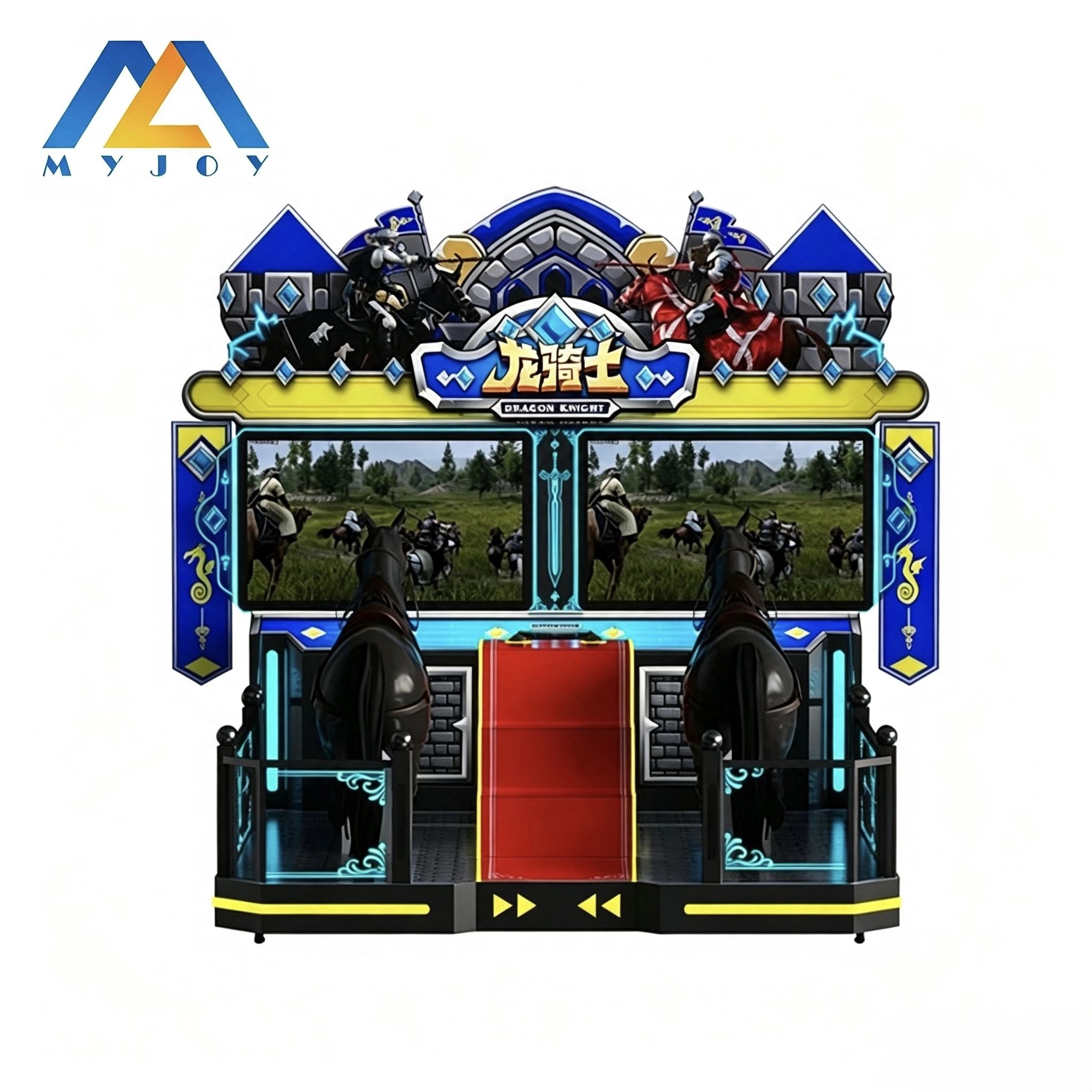
Flying Dragon Knight Horse Racing Simulator is a premium two-player arcade entertainment machine designed for amusement parks, shopping malls, arcades, family entertainment centers and themed attractions. Inspired by medieval knights and fantasy dragon adventures, this simulator combines realistic horse riding motion, interactive racing gameplay and an impressive visual design to create an unforgettable entertainment experience.
Featuring two realistic horse models, dual HD displays, dynamic motion control, vibration feedback and immersive sound effects, players can experience exciting horse racing competitions, adventure challenges and jumping missions. The machine recreates the feeling of real horseback riding through synchronized movement and responsive control systems.
With its eye-catching dragon knight appearance, colorful LED lighting, multiplayer competition mode and safe commercial design, Flying Dragon Knight Horse Racing Simulator is an excellent attraction solution for increasing customer engagement and entertainment value.
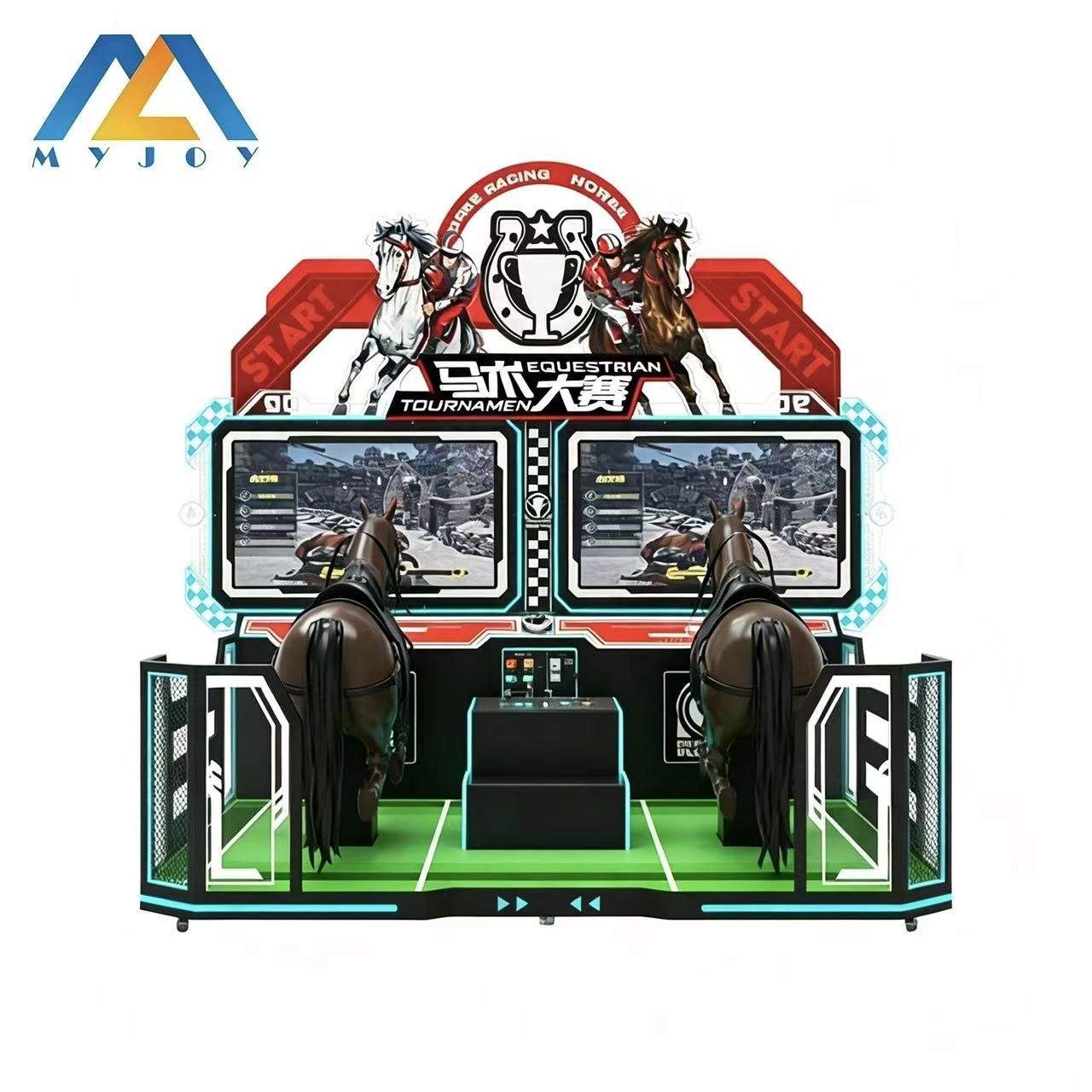
The Horse Racing Championship is a dual-player interactive sports simulator developed by Guangzhou Meiyilian Animation Technology Co., Ltd. It combines simulated horseback riding, competitive racing, physical interaction, and immersive visual effects to create an exciting attraction for players aged 5 to 50.
The machine features two realistic horse models equipped with comfortable saddles and reins. Players control their horses through riding movements and compete on two HD screens. Multiple racing scenes, difficulty levels, and challenge modes make the experience suitable for beginners and experienced players alike.
With its striking equestrian-themed design, dynamic LED lighting, green racetrack-style platform, and competitive ranking system, the machine easily attracts attention and encourages repeat play. It is ideal for amusement arcades, shopping malls, family entertainment centers, sports venues, theme parks, clubs, and tourist attractions.
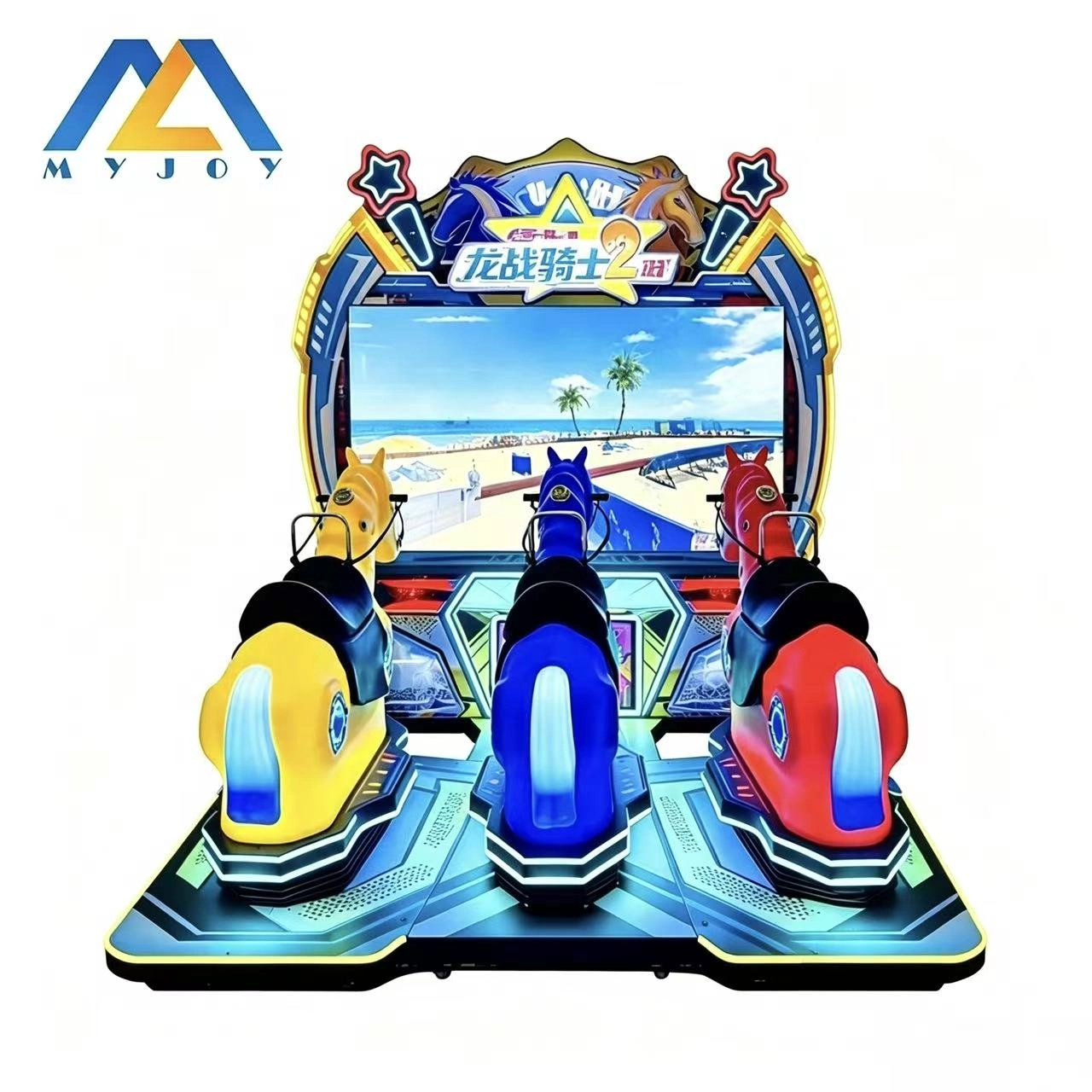
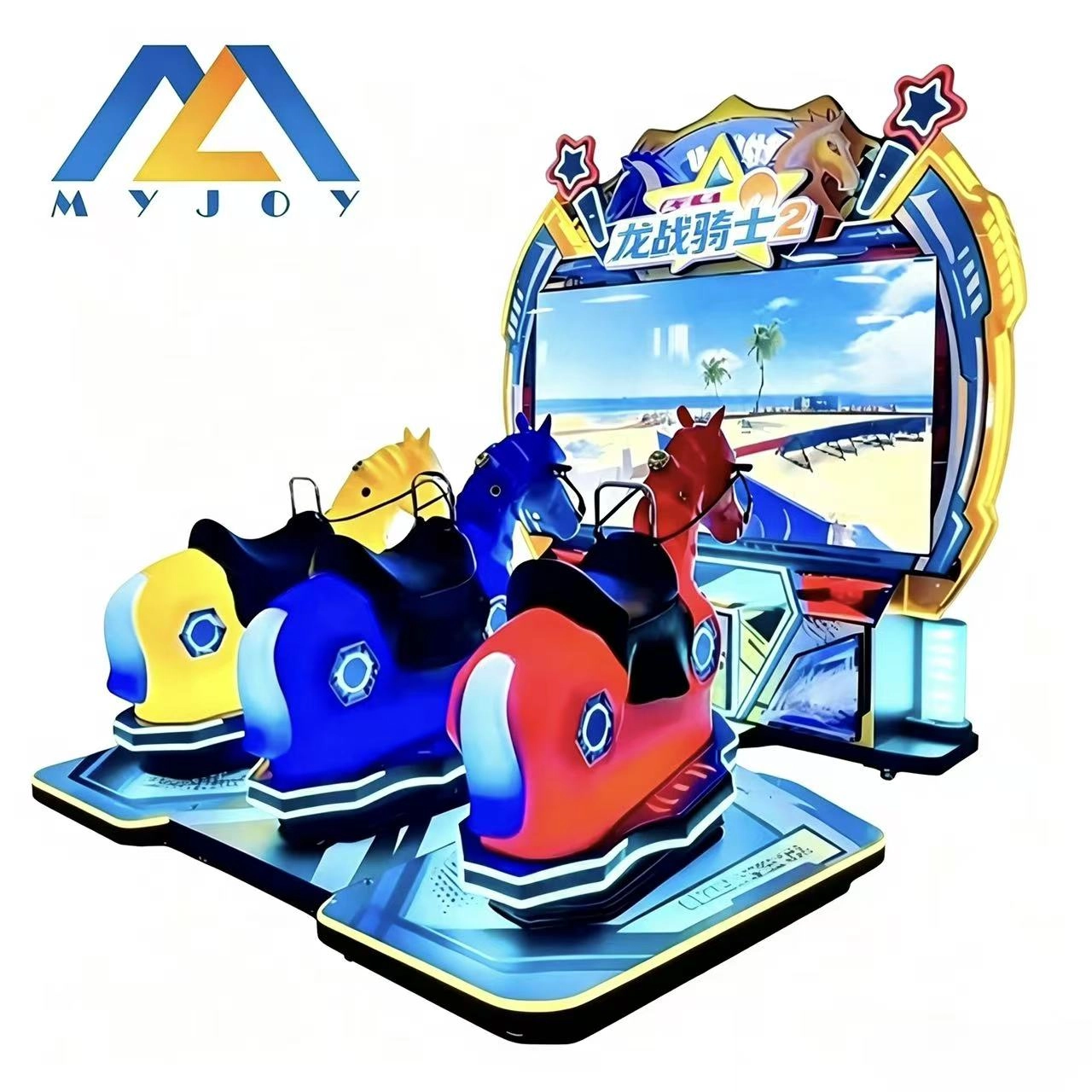
Dragon Warrior Knight 2 – Bring Real Horse Racing Excitement to Indoor Entertainment Venues
Dragon Warrior Knight 2 is an immersive interactive horse riding arcade machine designed around horse racing, obstacle challenges, and multiplayer competition. Featuring a cute and colorful horse design, large HD display, dynamic lighting effects, surround sound system, and realistic rein-control operation, this simulator creates an exciting horse racing experience for children, teenagers, and families.
Players can experience the feeling of riding a racing horse by controlling the reins to accelerate, change direction, and jump over obstacles. The realistic riding movements and interactive gameplay provide strong immersion and encourage repeat play.
The machine supports single-player challenge mode and 3-player competitive racing mode, allowing players to compete with friends, family members, or teammates. It is an ideal attraction for children's playgrounds, arcades, shopping malls, amusement parks, and family entertainment centers.
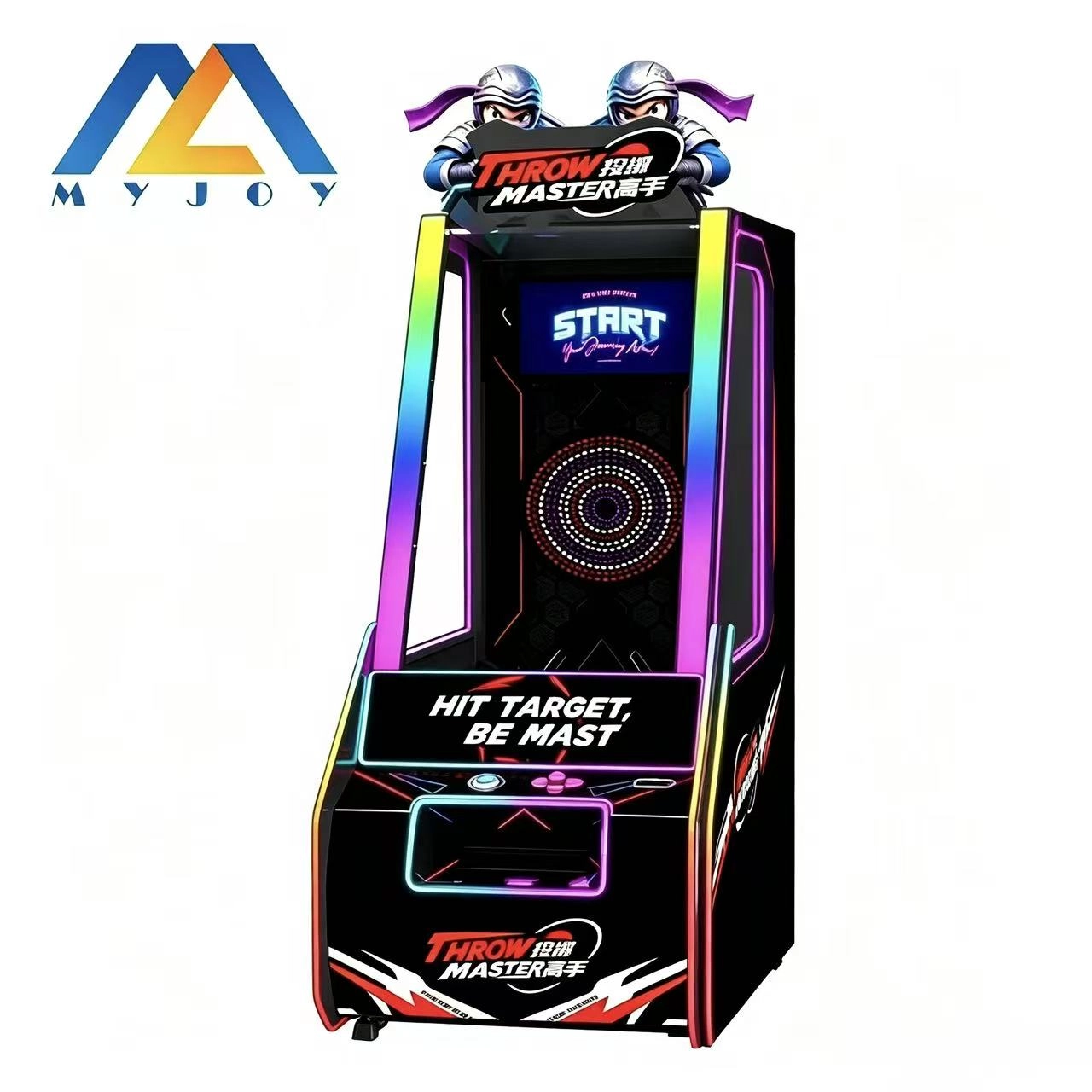
THROW MASTER is a commercial interactive dart throwing arcade machine that combines physical throwing action with an electronic target, digital scoring, on-screen interaction, and camera-based hit detection.
Designed for arcades, family entertainment centers (FECs), indoor amusement venues, shopping malls, and competitive entertainment spaces, THROW MASTER delivers an engaging mix of casual fun and skill-based competition.
Players insert coins, select their player and game mode, and throw darts at the large colorful electronic target. The system detects each result and displays scores, objectives, remaining throws, and game progress on the screen.
With Standard Mode for score-based challenges and Skill Mode for precision target challenges, the machine is suitable for both casual players and those looking for a more competitive experience. Leaderboards, adjustable game settings, and optional ticket rewards also make it well suited for commercial arcade operation.
Its large upright cabinet, colorful circular target, and vibrant RGB-style lighting create a futuristic arcade appearance that helps attract attention in busy entertainment venues.


No. 3, Wenjian Second Road, Wenbian Village, Shiji Town, Panyu District, Guangzhou City, China
Facebook